Spot the risky clause
before it is signed.
NexCLM analyzes your contracts with AI; it shows missing and risky clauses, obligations and deviations from your corporate standard with clause numbers. Template drafting, redlines, versions and multi-department approval, deadline tracking; all on one platform running in-house.
From drafting to renewal, every contract stage in one place
Legal, procurement, sales and finance work on the same platform; AI reads and compares, the authorized person decides.
AI risk analysis and legal score
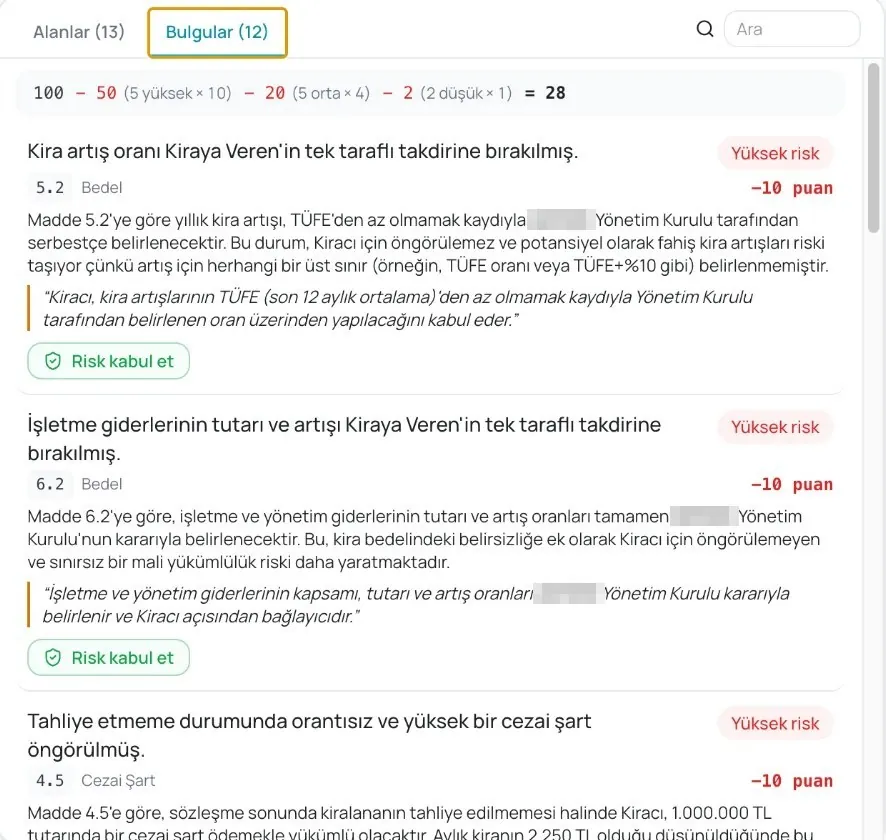
Reads the contract clause by clause; shows high/medium/low findings with clause numbers and quotes, and produces a legal score out of 100.
"Legal score 28/100 · 12 findings"Legal rule set
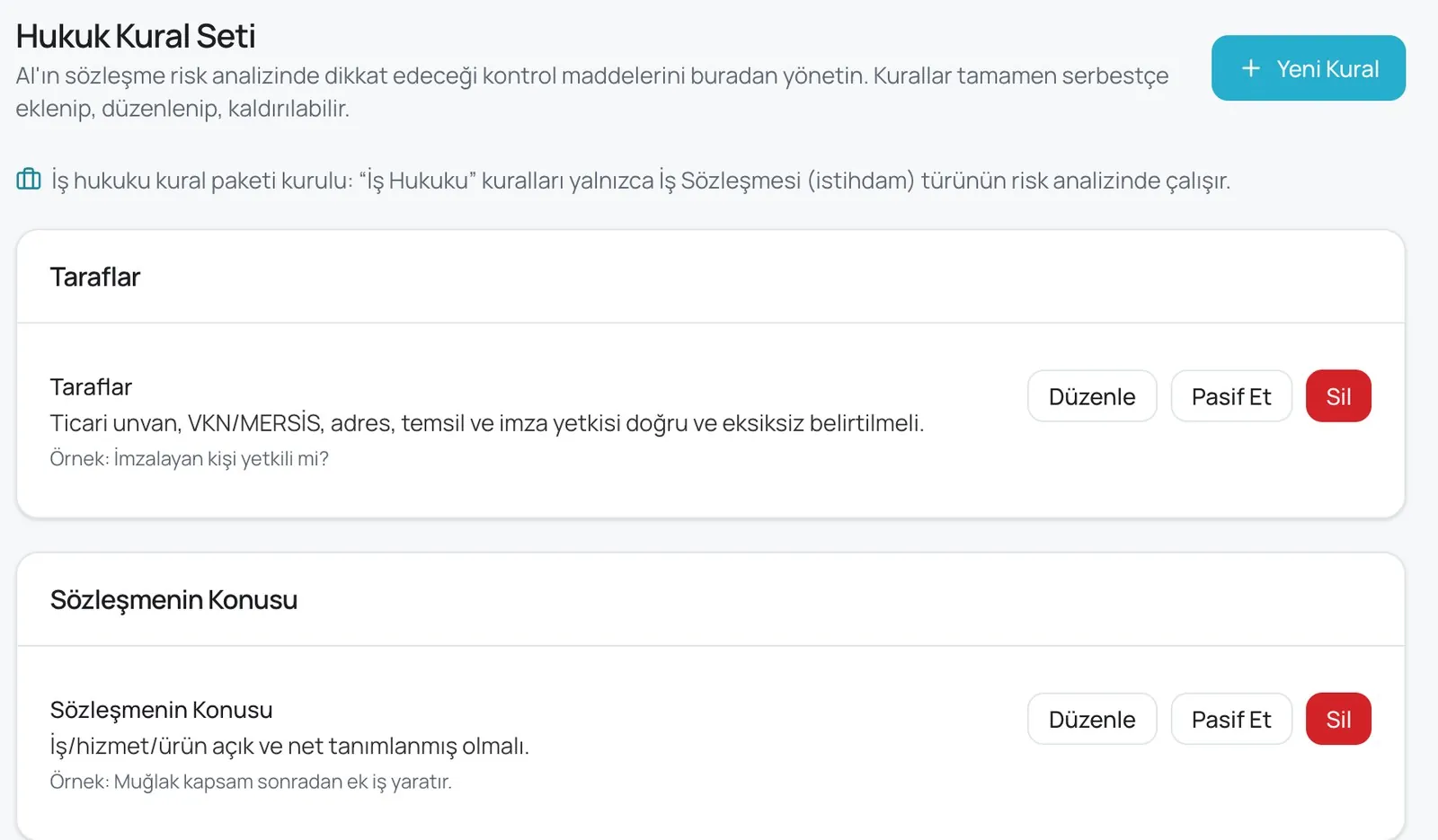
You manage the checks the AI will audit: parties, subject, scope, consideration… Rules can be added, edited or deactivated; contract-type specific packages.
"Employment-law package · employment contracts only"Template compliance and deviation matrix
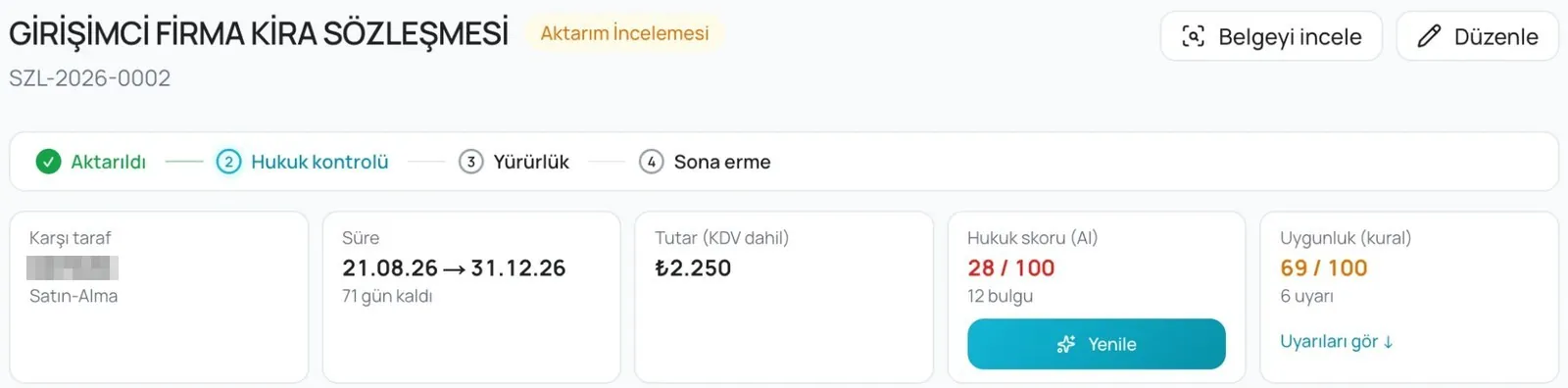
In a contract drafted from an approved template, every clause the counterparty changed appears in the deviation matrix; proceed with accept/reject while the compliance score updates.
"Compliance (rules) 69/100 · 6 warnings"Check mode and approval
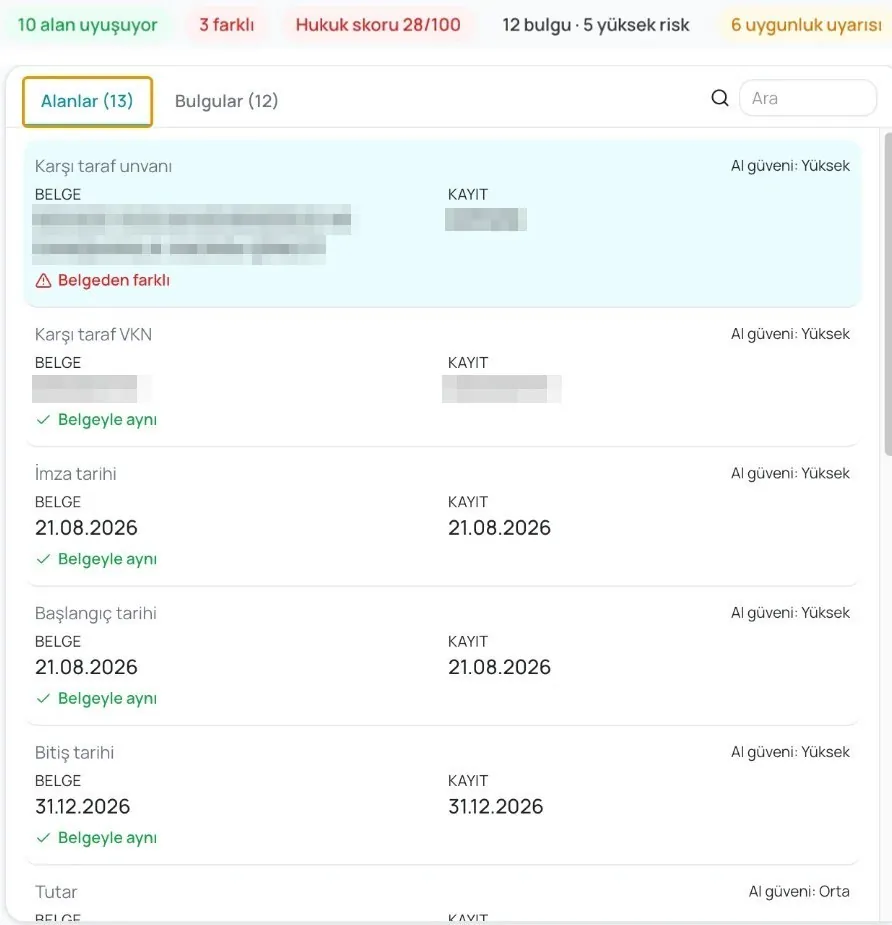
The signed document is compared with the record field by field (same as document / differs from document); the transfer is approved with a note, through the stages Transferred → Legal check → In force → Expiry.
"10 fields match · 3 differ"Obligation and deadline tracking
Renewal, termination notice, guarantee, price revision and penalty dates are tied to the calendar; the owner is reminded in advance.
"Termination notice · 30 days left"Search across contracts
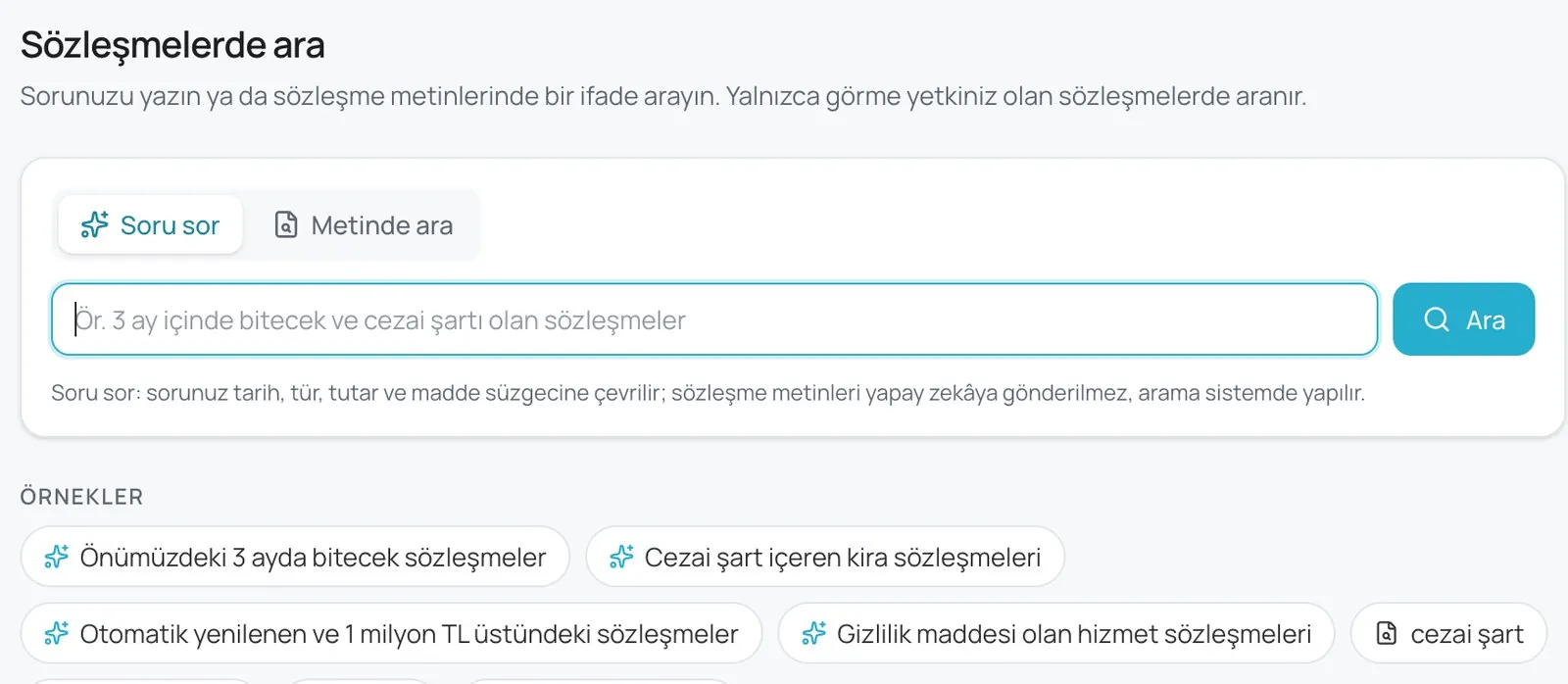
"Ask a question": your natural-language question becomes a date, type, amount and clause filter; "Search in text": phrase search. Only in contracts you are allowed to see.
"contracts expiring within 3 months with a penalty clause"How does it work with your contracts?
Pick your industry to see what NexCLM finds in which contract type and how it works with your team.

Know which clause binds you across hundreds of supplier contracts.
Finds price revision, delivery and quality penalty, guarantee and termination clauses in framework and purchase agreements; compares them with your corporate standard and shows deviations to procurement and legal.
- Supplier framework agreementsPrice indexation, minimum purchase commitments and unilateral termination clauses are compared with the standard.
- Delivery and quality penaltiesDelay penalties, rejection and return terms; penalty clauses without a cap are flagged.
- NDAs and confidentialityTerm, scope and exception clauses; alert on a missing confidentiality clause.
- Renewal and price revision calendarRevision windows and notice periods are reminded to procurement in advance.

Subcontractors, progress payments and guarantee periods in one place; no surprise delay penalties.
Finds inconsistencies between the main contract and subcontracts (duration, penalty, payment); tracks bank guarantee and insurance periods, interprets progress payment and price adjustment clauses.
- Main contract – subcontract alignmentChecks whether delay penalties, duration and payment terms are back-to-back.
- Guarantee and insurance periodsEarly warnings for bank guarantees, all-risk policies and final acceptance dates.
- Progress payments and price adjustmentPrice adjustment formula, advance offset and deduction clauses are summarized.
- Change orders and addendaVersions are linked; which addendum changed which clause, at a glance.

Long-term obligations in EPC, O&M and power sales contracts must not slip.
Extracts indexation, performance guarantee, availability and penalty clauses from 10–20-year contracts; ties annual revision and notice windows to the calendar.
- EPC and O&M contractsPerformance guarantees, availability rate and penalty/bonus mechanisms are summarized.
- Power sales and PPAsPrice indexation, minimum offtake and early termination clauses; the impact of changes is calculated.
- License and permit obligationsContract-bound reporting and notification dates on the calendar.
- Portfolio viewContract expiry and renewal map for all plants.

As supplier, dealer and logistics contracts grow, non-standard clauses must not multiply.
Compares high-volume supplier and dealership contracts with the corporate template; tracks exclusivity, returns, carrier SLAs and marketplace commission clauses in one panel.
- Supplier and brand contractsExclusivity, shelf share, returns and campaign participation clauses are compared with the standard.
- Dealerships and franchisesTerritory, target and termination terms; renewal dates on the calendar.
- Logistics and carrier SLAsDelivery time, damage liability and penalty clauses are summarized.
- Marketplace and payment contractsCommission, payment terms and unilateral change rights are flagged.

License, SLA, NDA and data processing agreements; the same standard for every customer.
Extracts liability caps, SLA credits, IP and KVKK data processing clauses from customer and vendor contracts; compares what sales promised with legal's standard.
- License and subscription agreementsLiability caps, auto-renewal and price increase clauses are flagged.
- SLAs and service creditsAvailability commitment, credit calculation and exceptions are summarized.
- NDAs and intellectual propertyConfidentiality term, inventions and source code rights are checked.
- KVKK / data processing (DPA)Sub-processor, cross-border transfer and deletion obligations are compared with the standard.

Less compliance and deadline risk in distributor, hospital supply and research agreements.
Tracks exclusivity, license, price and sensitive-data clauses in distribution, hospital tender and clinical research agreements; shows non-standard clauses to the compliance team.
- Distribution agreementsExclusivity, minimum purchase, license transfer and termination clauses are compared with the standard.
- Hospital and institutional supplyDelivery time, cold chain, penalty and guarantee clauses are summarized.
- Clinical research agreementsEthics committee, insurance and data sharing obligations are tied to the calendar.
- Sensitive personal dataKVKK health data clauses; alerts on missing consent and transfer provisions.

Across hundreds of leases, rent increases, eviction and renewal dates must not slip.
Extracts rent indexation, extension options, termination notice and deposit clauses from store, office and warehouse leases; keeps the portfolio calendar on one screen.
- Rent increase and indexationCPI/PPI indexation, fixed increase and cap clauses are summarized.
- Termination and extension noticesNotice periods on the calendar; alerts as the last day approaches.
- Deposits and guaranteesRefund terms and set-off rights are flagged.
- Portfolio viewExpiry, option and increase dates for all locations.

Contract standards, authority and audit trail across subsidiaries, in one place.
Collects all group company contracts in one archive; sets approval flows by authority matrix, reports non-standard clauses, and provides traceable records for internal and external audit.
- Group contract standardThe same playbook across all companies; deviations reported per company.
- Authority matrix and approval flowWho approves is determined automatically by amount and type.
- Audit trailWho approved which version and when; audit-ready records.
- Financial obligation viewGuarantees, sureties, commitments and payment calendars consolidated.
Every clause is compared with your corporate standard; deviations come with reasons.
Upload the contract; NexCLM classifies the clauses, rates missing and risky provisions as high/medium/low and offers the standard clause from the playbook defined with your legal team as a counter-proposal. Every finding is tied to a clause number; review takes minutes, the decision stays with the authorized person.
- Missing clauseConfidentiality, force majeure, liability cap, governing law; alerts on absent provisions.
- Risky provisionUncapped penalties, unilateral termination, auto-renewal, unlimited liability.
- Standard deviationValues such as payment term, guarantee ratio and notice period are flagged when outside the playbook range.
- Counter-proposal (redline)The standard clause text is added as a redline with one click and enters the approval flow.
Approvals follow the authority matrix; deadlines are tied to the calendar
Every contract passes through Transferred → Legal check → In force → Expiry; the legal check compares the record with the signed document and closes with a note. The contract does not end at signature: renewal, notice, guarantee and price revision dates are reminded to the owner in advance (calendar data is illustrative).
Dates are extracted from contracts automatically and reminded to owners 60/30/7 days ahead; missed notices drop to zero.
- Termination notice due · Bursa store lease12 daysOwner: Real estate manager · 60- and 30-day reminders sent
- Bank guarantee renewal · subcontractor34 daysOwner: Project manager
- Price revision window · framework supply58 daysOwner: Procurement · index: 12-month PPI
- Auto-renewal · SaaS license117 daysOwner: IT · cancellation notice 90 days ahead
Check mode, legal rule set and search across contracts
Real NexCLM screens. Identity and contact details have been removed from the images.
Four steps, in-house
- 01
Upload
The existing archive (including scanned PDFs), templates and the playbook defined with your legal team. Contracts are classified, critical clauses extracted.
- 02
Analyze
Every new contract is read clause by clause: risk level, missing clauses, standard deviations and counter-proposals within minutes.
- 03
Approve
Redlines and versions; legal, procurement, finance and management approval by authority matrix. Signing is completed with your existing e-signature/KEP process.
- 04
Track
Renewal, notice, guarantee and revision dates; portfolio reports and audit trail. As the playbook is updated, analyses update too.
A poorly managed contract loses value quietly
These figures are measurements by independent organizations and industry surveys, not NexCLM results; your outcome depends on contract volume and process. Sources: World Commerce & Contracting, "Contract Management: An Overlooked Driver of Business Agility and Financial Performance" (2025); Seal Software-supported Fortune 1000 lawyer survey.
Common questions
Does NexCLM replace legal advice?
No. NexCLM speeds up your legal team's work: it finds risky and missing clauses, compares them with your corporate standard and suggests wording. The final decision always belongs to the authorized person; every finding is shown with its clause number, so review takes minutes.
How is the corporate standard (playbook) defined?
During setup, your standard clauses, acceptable ranges and red lines are defined together with your legal team (e.g. payment term max 60 days, liability capped at the contract value). The playbook can be updated later; all analyses run against the new standard.
Can we bulk-upload our existing contracts?
Yes. The existing archive, including scanned PDFs, is bulk-uploaded, read with OCR and classified; counterparty, type, expiry date and critical clauses are extracted automatically. Questions like "contracts with unlimited liability" are answered from day one.
Is there an e-signature?
NexCLM does not include e-signature; it handles drafting, analysis, approval and tracking. Signing is completed with your existing e-signature / registered e-mail (KEP) or wet-ink process; the signed copy is linked to the archive.
Which languages does it analyze?
Full support for Turkish and English contracts; coverage for other languages is defined during discovery. In bilingual contracts, differences between the two texts are also flagged.
Where is our data stored, is it KVKK-compliant?
Your contracts are stored on-premise or in your own cloud; nothing is transferred outside. Access follows the authority matrix and every action is logged in the audit trail. A fully isolated installation is possible.
Does it connect to our ERP, CRM and document systems?
Yes. Connections for procurement (ERP), sales (CRM), document management (SharePoint, DMS) and e-mail/calendar are ready; other systems are connected via API. In the discovery call we list your current systems together.
How long does setup take and how is it priced?
Usually 3–6 weeks including playbook definition and archive upload. Pricing is an annual license + setup based on the number of users, contract volume and integration scope; we plan it together in a 30-minute call.
See NexCLM with your own contract
In a 30-minute demo we upload one of your contracts together; see the risky clauses and standard deviations with your own eyes.